Version 0.2.4, released 2026-11-23. Changelog
KyPanel Install

Features

What a KyPanel server runs, and what you, your resellers and your customers can do in the panel. Each section links to its page in the documentation.

Web and PHP

Web server
nginx in front of Apache. Each domain also answers on panel. and webmail. over HTTPS, so customers never need a port number.
PHP versions
8.1, 8.2, 8.3, 8.4 and 8.5 installed side by side. A server default, and a version per domain set by you or by the customer.
PHP-FPM
A pool per account and per version, running as the account's user. Workers start on demand, so an idle site runs no PHP processes.
php.ini
Global values per version in the php.ini editor. Customers can change a fixed, safe subset per domain.
Extensions
Install or remove any extension package the repository has for a version, such as redis, imagick or intl.

Email

Software
Exim for SMTP, Dovecot 2.4 for IMAP, POP3 and Sieve filters, Rspamd for spam scoring, Roundcube for webmail.
Mailboxes
Mailboxes with quotas, forwarders, domain forwarders, autoresponders, filters and a default address for each domain.
Authentication
DKIM signing, SPF and DMARC for each domain when it is added. Email Deliverability checks the records and repairs missing ones in local zones.
Spam
Rspamd learns from the server's own mail and from every message a user moves into or out of Junk.
Sending limits
Hourly limits per account for mail clients and scripts. An account that sends to an unusual number of recipients can have its outgoing mail held until you release it.
Queue and delivery
Mail Queue Manager, delivery reports with the remote server's answer, and a troubleshooter that shows how an address is routed.

DNS

Server
PowerDNS, authoritative, on the server. Each account's domain gets a zone created from a template.
Zone editor
A, AAAA, CNAME, MX, TXT, SRV, CAA, NS and more. Turn a record off without deleting it, edit the SOA, import or export BIND zone files.
Templates
Edit the default templates or make your own, with variables for the domain, IPs, nameservers and hostname.
Nameservers
Two to four for the server. Each reseller can have its own.
Cloudflare
Customers can publish their zones to Cloudflare from their panel, with the proxy setting per record.

SSL

AutoSSL issues and renews free Let's Encrypt certificates for every site that points to the server: the domain, www, aliases and the panel, webmail, autoconfig and autodiscover names. The hostname gets its own certificate for the panel, mail and FTP, and each domain whose mail is received on the server gets one for mail. as well.

Names are checked before the order, so a name that doesn't point to the server is skipped instead of failing. Wildcards are validated through DNS when the zone is on the server or on Cloudflare. Customers can also install their own certificates.

Databases

MariaDB 11.8 LTS. Database and user names carry the account's prefix. Customers create databases and users, set grants, allow remote access by IP and open phpMyAdmin without a second password. phpMyAdmin runs on its own port and PHP pool, apart from the panel.

Files and shell

File Manager
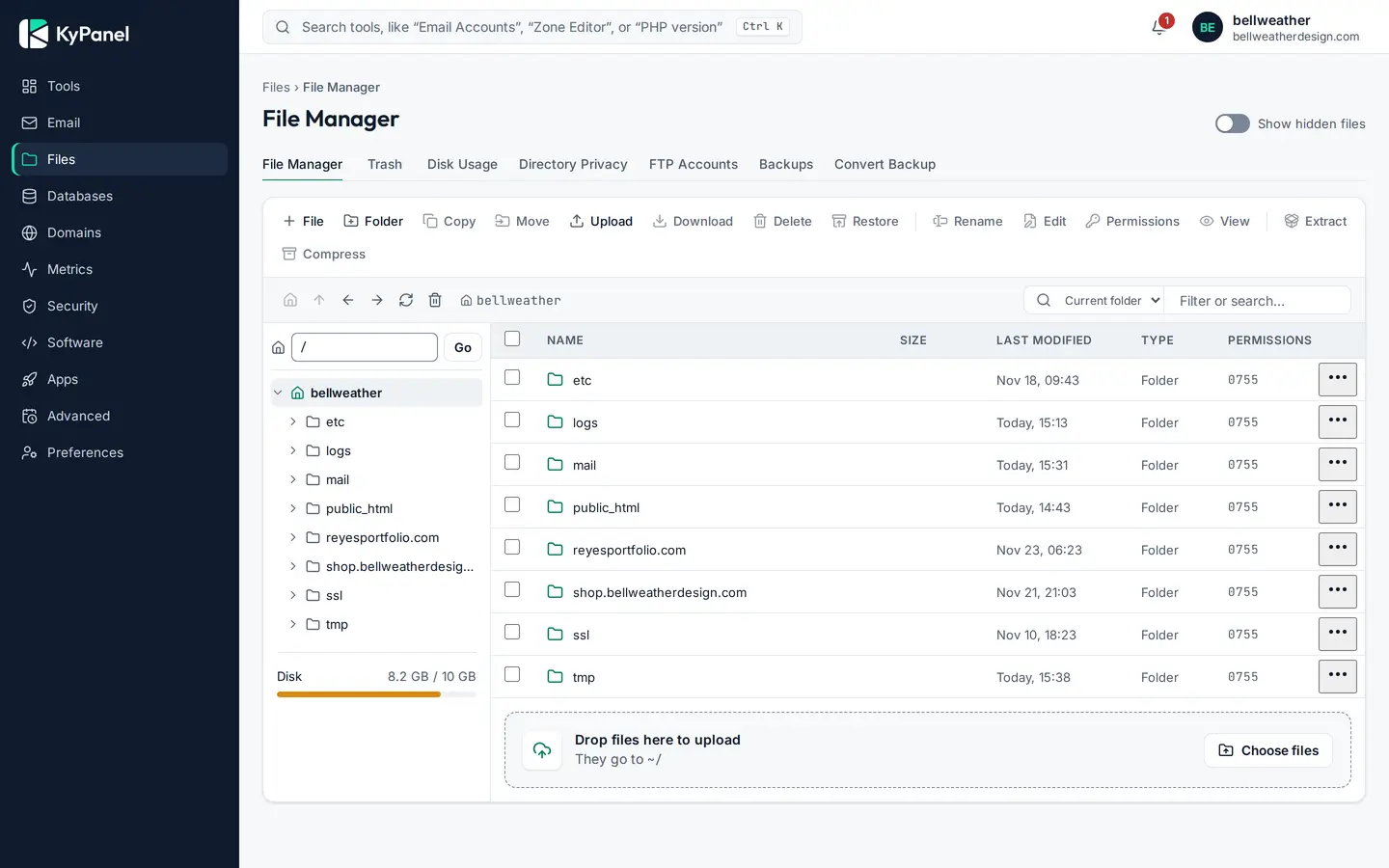
Editor, permissions, archives and a trash folder.
FTP
Pure-FTPd with TLS. Extra FTP accounts with their own folder and quota.
SSH
Keys generated or imported in the panel, SFTP with the same keys, and a terminal in the browser.
Shell access
Set per package: no shell, a jailed shell that sees only the account's files and a minimal system, or a normal shell.
File Manager in the customer panel
File Manager.

Backups

Backups are off after install. Turn them on in Backup Configuration and choose:

SettingOptions
TypeCompressed (one file per account), uncompressed, or incremental (only changed files are copied)
ScheduleDaily on chosen days, weekly, monthly on chosen days of the month, each with its own retention
DatabasesA dump per database, the whole MariaDB data directory, or both
DestinationsA local directory, Amazon S3, S3-compatible storage (Cloudflare R2, Backblaze B2, Wasabi, MinIO), SFTP, rsync over SSH, FTP or FTPS

Restore a whole account, or only its files, databases, mail or DNS. Customers can make a full backup of their own account, download parts of it, and restore files or folders from the server's backups.

Resource limits

Each account runs in its own cgroup (v2), with the limits of its package:

  • CPU, as a percentage of one core
  • Memory for all of the account's processes
  • Disk I/O in MB/s and operations per second
  • Processes and threads, and concurrent PHP requests (entry processes)
  • Inodes and disk quota

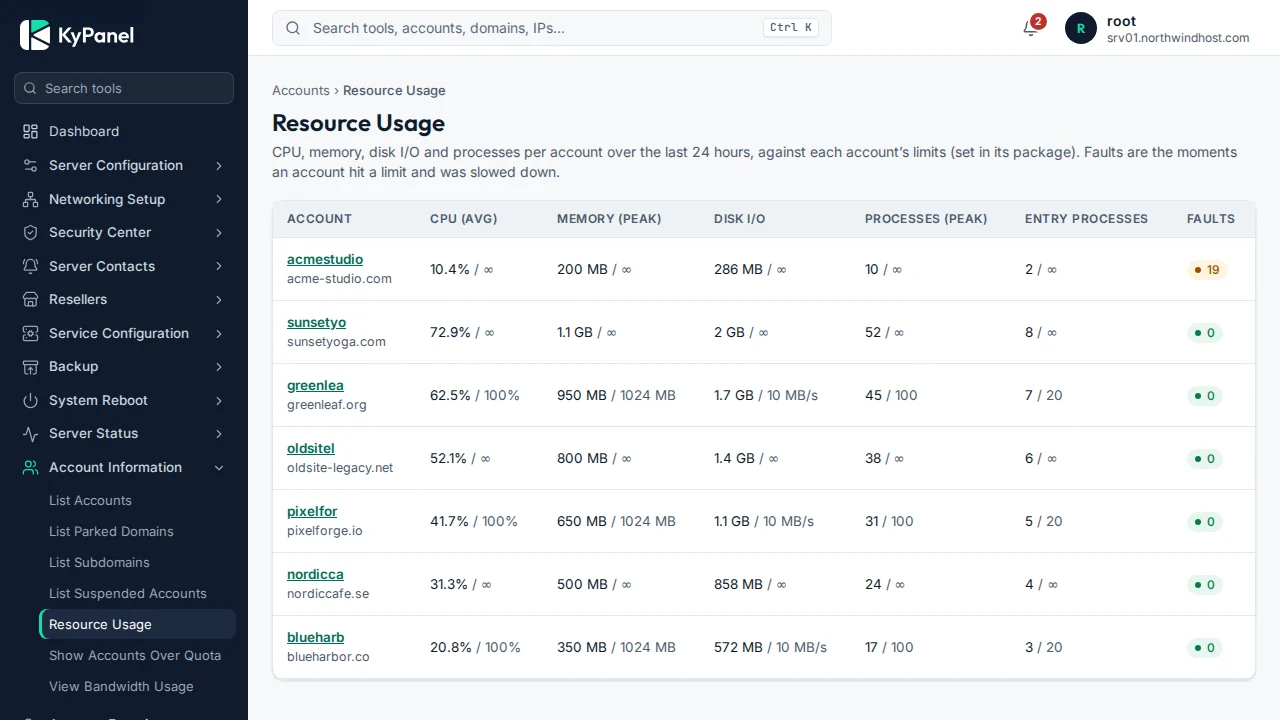
Resource Usage shows each account's use and the times it hit a limit, to you and to the customer. On CloudLinux, KyPanel applies the limits through CloudLinux's own system, and the CloudLinux license stays yours.

Resource Usage per account with CPU, memory, disk I/O, processes and limit hits
Resource Usage in Ky Admin.

Accounts and packages

Packages
Disk, bandwidth, domains, mailboxes, databases, FTP accounts, hourly mail, resource limits, PHP workers and shell access. Changing a package updates every account on it.
Feature lists
Every tool of the customer panel is a feature. A list per package decides which ones its accounts see, such as a mail-only plan without web tools.
Account actions
Modify, change plan, quota, password, IP or owner, rename the user or main domain, sign in to the customer panel, reset two-factor, repair.
Suspension
Sites show a suspended page and logins stop, while incoming mail is still delivered. A locked suspension can only be lifted by root.
Audit log
Every change in the panels or the API, with who made it, from where and through what.

Resellers

A reseller is a hosting account that can create and manage accounts of its own. It signs in to Ky Admin and sees only its accounts, its packages and the tools its privileges allow. The API applies the same privileges.

Limits
Number of accounts, and total disk and bandwidth to hand out, with optional overselling.
Privileges
Granted one by one or through privilege lists: accounts, DNS, packages, SSL and branding.
Nameservers
Its own, shown to its customers and used in their zones.
Branding
Logo, colors and name on its customers' panels, sign-in pages and site error pages.
Support
Root can open Ky Admin exactly as a reseller sees it. Everything done there is logged as root.

Mail and database nodes

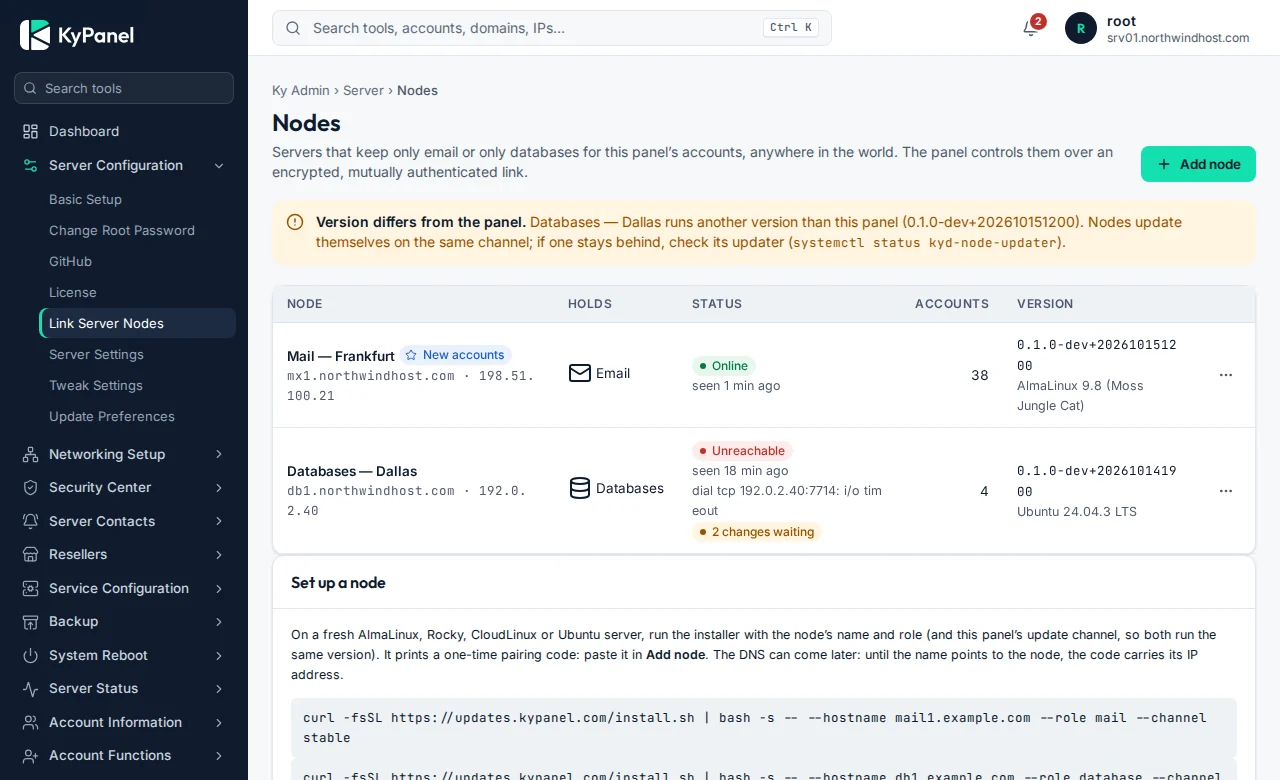
A node is a separate server that runs only mail or only MariaDB for a panel server. The panel creates mailboxes and databases on it, shows its services, firewall and processes, and updates it with the same release. The link between the panel and a node is mutually authenticated TLS. Nodes don't need a license.

New accounts choose their mail server and database server. With a mail node, all of the accounts' mail is received and sent from it.

Link Server Nodes with a mail node and a database node
Link Server Nodes.

Updates

Releases
Stable and beta channels. Each release is signed, and the server checks the signature and checksum before anything runs.
Rollback
An update backs up the panel's binaries, database and service configuration, and rolls everything back if the panel doesn't answer afterwards. Sites and mail keep running during an update.
Operating system
Security updates every day. Services still running an old library are restarted, and the server never reboots on its own.
Security fixes
Servers check for security advisories every 15 minutes and install those fixes right away.

Moving servers

KyPanel Server Transfer copies a whole KyPanel server, or some of its accounts, to another one: settings, accounts, Cloudflare and GitHub connections and API tokens, with the DNS records changed to the new addresses. The old server keeps running until you switch. Accounts from other panels come in through the import tools.

API and automation

Every screen of the panel uses the REST API, documented in an OpenAPI reference. API tokens have scopes and can be limited to IPs and given an expiry. The ky command line, webhooks and single sign-on are covered on the integrations page, with the billing modules.

Connected apps

Apps that support the Model Context Protocol (MCP), such as ChatGPT and Claude, can work on the panel with your permissions: create an account, add a mailbox, change a site's PHP version. You sign in on your own panel's page and choose what the app reaches: the server, one hosting account or one mailbox, optionally read-only. Every change is confirmed before it runs, and it is recorded in the audit log with the app's name.

A server or account connection manages mailboxes but never reads them. Requests pass through KyPanel's gateway at mcp.kypanel.com without being stored, as described in the privacy policy.

App hosting

Apps deploy a Git repository to a domain of the account, with releases, rollback, queue workers, the Laravel scheduler and a Redis-compatible cache. See App hosting.

Not yet

These come up often and aren't in KyPanel today:

  • ARM servers. The panel runs on x86_64 only; the ky command line runs on ARM.
  • Separate logins for support staff in Ky Admin. There is one administrator login, and API tokens for scripts and billing systems.
  • Imunify360 integration.
  • A DNS cluster. Zones are served by the server's own DNS, or published to Cloudflare.
  • Installing on a server that already hosts sites. KyPanel needs a fresh server.
  • PostgreSQL databases.